


Last Updated on 28. September 2026
An AI coding agent that runs locally on a developer’s machine has the same rights as that developer: access to files, network, credentials. That is exactly what makes it a security risk. The team behind ESACA, short for the European Sovereign Agentic Coding Appliance, built a sandbox for exactly this problem, with a key twist: the agent never gets to see credentials at all, not even for the services it is allowed to use. The solution was recently presented by Trình Đức Trần from the ESACA team, using an internal HR project as the example.
Behind ESACA are mgm technology partners and Fsas Technologies, a Fujitsu company. The initiative enables sovereign, AI-powered coding where code and data never leave your own data center. This is exactly where the new sandbox comes in. It consistently isolates the coding agent from its environment. It runs in its own, sealed-off environment, not directly on the developer’s machine. Every access to files, network, or credentials must be explicitly granted. The sandbox itself is designed as a generic solution and already works with different coding agents today, including Claude Code and OpenCode. Read more about the cooperation
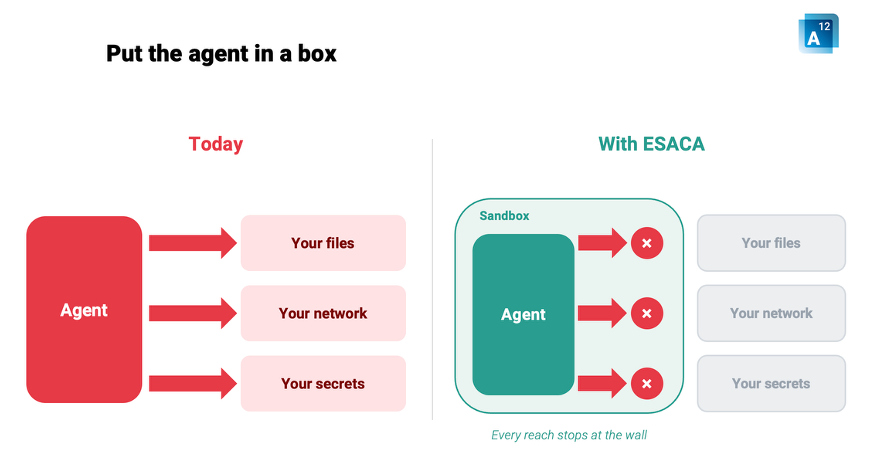
Why a coding agent should not just run on your machine
A coding agent is usually installed like an ordinary development tool, directly on the workstation. Technically, that means the agent sees the same files as its user. It can access the same network. In doubt, it also has access to locally stored credentials, covering things like Git repositories, internal tools, or cloud services. For a script that autonomously writes and tests code, that is a considerable risk, regardless of how reliable the underlying model is. A single misunderstood command is enough. A compromised dependency is just as capable of letting sensitive data leave the company.
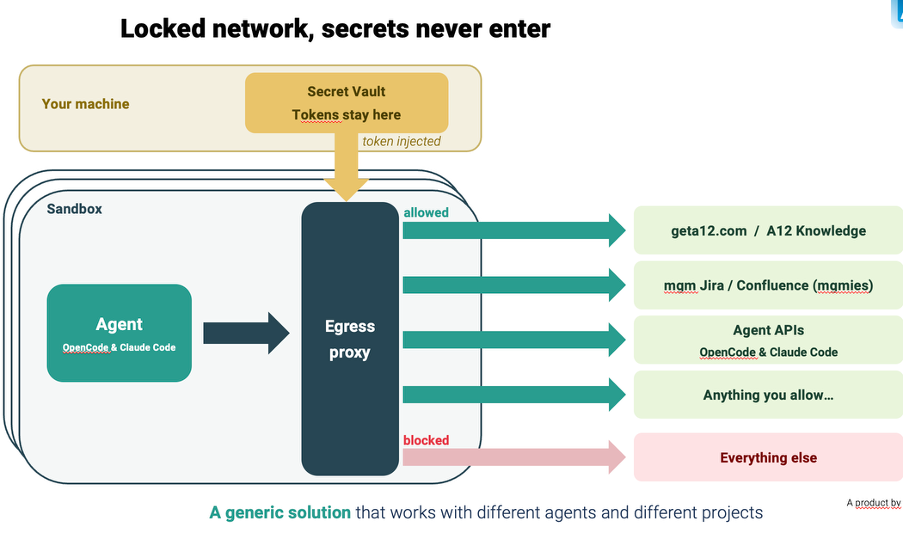
How the ESACA sandbox controls access
The ESACA team’s solution encapsulates the agent in its own sandbox. By default, it has no access to files, network, or credentials there. For every project, developers specifically define which directories the agent may see. They also define which external services it may talk to, such as an internal knowledge base, the ticketing system, or a so-called MCP server, short for Model Context Protocol server. Every outgoing request from the sandbox first passes through a component called the egress proxy. It is a checkpoint that filters every outgoing connection. It checks whether the request’s destination is on the approved list. Everything else gets blocked. That way, the agent gets exactly the slice of the outside world a project actually needs. Nothing more, nothing less.
Credentials the agent never gets to see
This matters most for credentials. Passwords, API keys, and tokens always stay in a secret vault, a protected digital store for credentials, on the host machine. They never enter the sandbox itself. Only right before an approved request actually goes out does the access token come into play. The egress proxy component inserts it at exactly that moment. The coding agent therefore never lays eyes on the secret. As a result, it can neither accidentally leave it behind in generated code nor pass it on to another service.
“We put the agent inside a box where, by default, it has no access to files, network, or credentials,” says Trần. “The coding agent never gets to see the credentials at any point, they always stay on the user’s own machine.”
From an A12 project to a secure agent environment in a few clicks
This protection should not become a hurdle in everyday work. That is why the ESACA team built an integration layer for the A12 AI Low Code Platform. Starting from an existing A12 project, it takes about five to six clicks to create a fully configured sandbox. Its coding agent already comes with all the relevant A12 plugins, the A12 knowledge base, and suitable default access rules. The HR project team mentioned earlier took exactly this route. They demonstrated their sandbox live in the process.

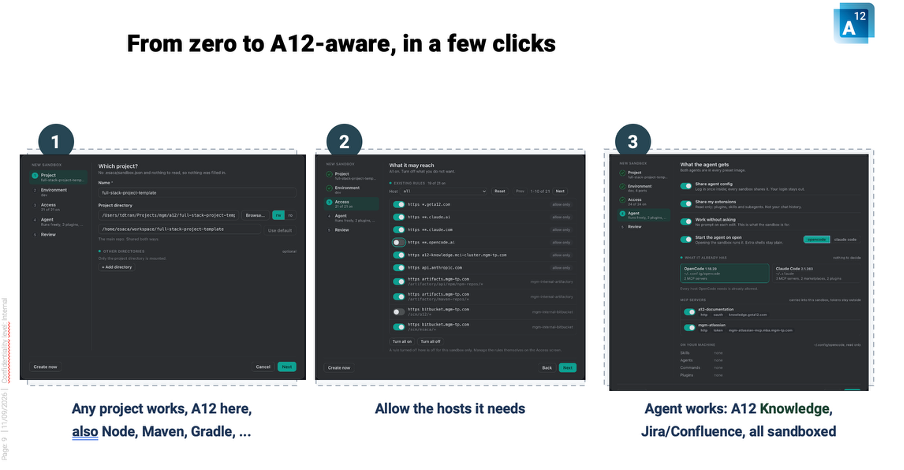
The A12 integration now supports both coding agents as well, Claude Code and OpenCode. ESACA is delivered through two channels: a desktop application and a command-line tool. Both produce the same sandbox and run on Windows, macOS, and Linux. To get started, there are preconfigured presets with sensible default access rights. These can be extended or restricted at any time as needed.
What this means for your organization
Sandboxing is not an extra layer of security paperwork that slows down everyday development. It is a technical mechanism built directly into the workflow. Developers keep the speed of an AI coding agent, while the IT department keeps control over what is allowed to leave the company’s own infrastructure. Many organizations have to comply with requirements like NIS2, ISO 27001, BaFin regulations, or the GDPR. For them, that is an important distinction. It is the difference between a vague assurance and a real, technically enforced control point. According to the team’s current plans, the sandbox will become available with expanded AI integration later this year, alongside support for additional coding agents.
- For how ESACA specifically prevents data leakage for critical infrastructure companies and public authorities, see the article Agentic Coding without Data Leakage: ESACA for Critical Infrastructure Companies and Public Authorities.
- To see how this sandbox fits into the bigger picture of ESACA, take a look at the Workbench. It is the production environment for coding agents, complete with a binding approval process and audit trail. The sandbox described here provides the technical foundation for that controlled execution.
- For the broader connection between AI and digital sovereignty, read the article Digital Sovereignty in AI: Europe Must Act Now.
Want to see ESACA and the coding agent sandbox in your own environment?
Frequently Asked Questions
What is the ESACA sandbox?
An isolated environment for an AI coding agent. By default, it has no access to files, network, or credentials on the host machine. Access is granted on a per-project basis. An egress proxy component controls it.
Which coding agents does the sandbox currently support?
ESACA already supports both Claude Code and OpenCode today, for the generic sandbox as well as for the A12 integration.
How does the sandbox prevent credentials from falling into the wrong hands?
Credentials stay on the host machine. The egress proxy component inserts the matching token only right before an approved request is sent. The agent itself never sees the secret.
What systems does the ESACA sandbox run on?
It is available as a desktop application and a command-line tool. Both use the same sandbox and run on Windows, macOS, and Linux.
How do you connect the sandbox to an A12 project?
Starting from an existing A12 project, it takes about five to six clicks to create a fully configured sandbox. It comes with an A12-aware coding agent, matching plugins, and default access rules.